Agent Shift Management
I led the development of an internal workforce platform used by 3,000+ support agents, replacing spreadsheet-based rosters with live attendance tracking, shift planning, leave and swap workflows, and operational insights.

- Live attendance
- Shift templates
- Leave & swaps
- Adherence insights
- Bulk rosters
- Weekly calendars
- Utilization reports
All visuals in this case study use fictional data. The interface has been recreated and modified to protect the confidentiality of the original internal product.
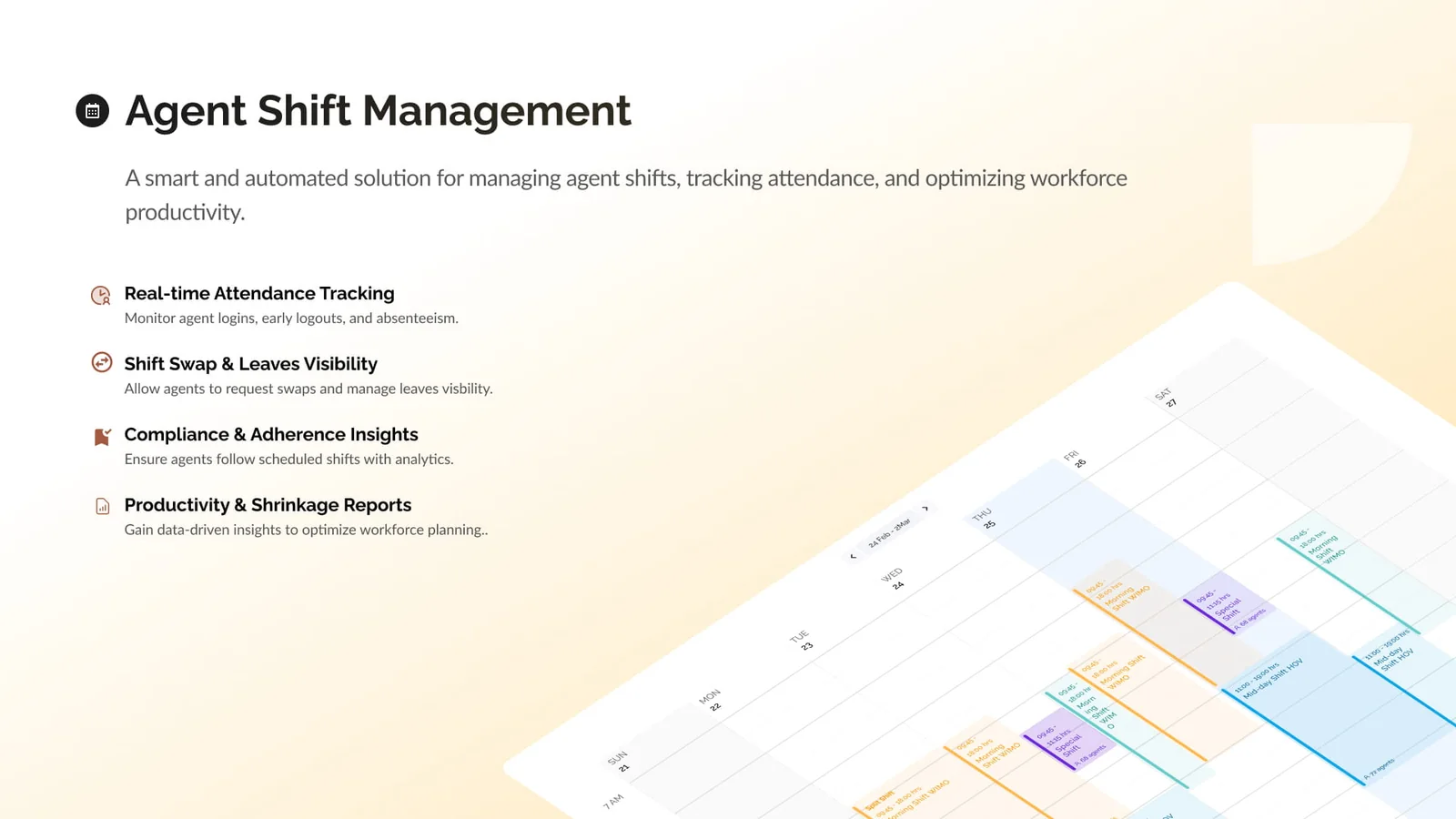 Four things the platform had to do that a spreadsheet could not.
From spreadsheets to live operations
Every week, a large support operation was planned inside a spreadsheet.
The roster showed who was expected to work, on which day, and during which shift. It worked as a schedule, but that was where its usefulness ended.
It could not show who had actually logged in, who was late, who had left early, or where a team was understaffed. Leave requests and shift changes happened through conversations and manual edits. Attendance lived in separate CSV files. Performance data existed elsewhere.
The schedule described the plan, but there was no single place that reflected what was actually happening.
That gap became the starting point for the Agent Shift Management System.
Project overview
I led this project from its early discovery phase through implementation and adoption.
The goal was to build a central workforce platform where agents, team leads, and supervisors could plan shifts, manage schedule changes, track attendance, and understand workforce performance.
The final system brought together:
- Shift templates and daily schedules
- Bulk roster creation
- Weekly calendar views
- Leave and shift-swap workflows
- Real-time attendance tracking
- Adherence and compliance insights
- Workforce utilization and shrinkage reports
The platform eventually became part of the daily workflow for more than 3,000 support agents.
Understanding the real problem
Support demand changes throughout the day.
A quiet weekday morning may require a relatively small team. Lunch and dinner peaks need significantly more coverage. Festivals, sporting events, campaigns, and other high-demand periods introduce another layer of complexity.
Operations teams used historical demand and order forecasts to estimate how many agents would be needed during each period. Based on those forecasts, they created shifts and manually assigned people through spreadsheets.
This process created several problems.
Schedules were disconnected from actual attendance. Leave and shift-swap requests required manual coordination. Supervisors had limited visibility into late logins, early logouts, and no-shows. It was also difficult to compare planned staffing with actual workforce availability.
Most importantly, the data needed to improve future planning remained scattered across sheets, CSV files, and separate internal systems.
Learning from the people using it
Before designing the product, we visited support offices and studied how schedules were created and managed on the ground.
That exercise changed our understanding of the problem.
The existing spreadsheet might have looked simple, but the process around it was not. Different teams followed different shift structures. Some agents worked split shifts. Shift swaps happened frequently. People occasionally faced system issues that prevented them from logging in on time. Team leads also needed the ability to correct attendance records when the system did not reflect what had actually happened.
These were not rare edge cases. They were part of everyday operations.
The challenge was not simply to move a spreadsheet into a web interface. We had to build a system structured enough to automate repetitive work while remaining flexible enough to handle real operational exceptions.
Building the foundation
We started with shift templates.
A shift template defined a reusable schedule, including its timing, duration, and applicable period. Operations teams could create standard morning, afternoon, evening, split, and event-specific shifts without rebuilding the same structure every week.
Once the templates were ready, administrators could upload a roster through a CSV file. The system combined each agent, date, and shift template to create individual daily shift records.
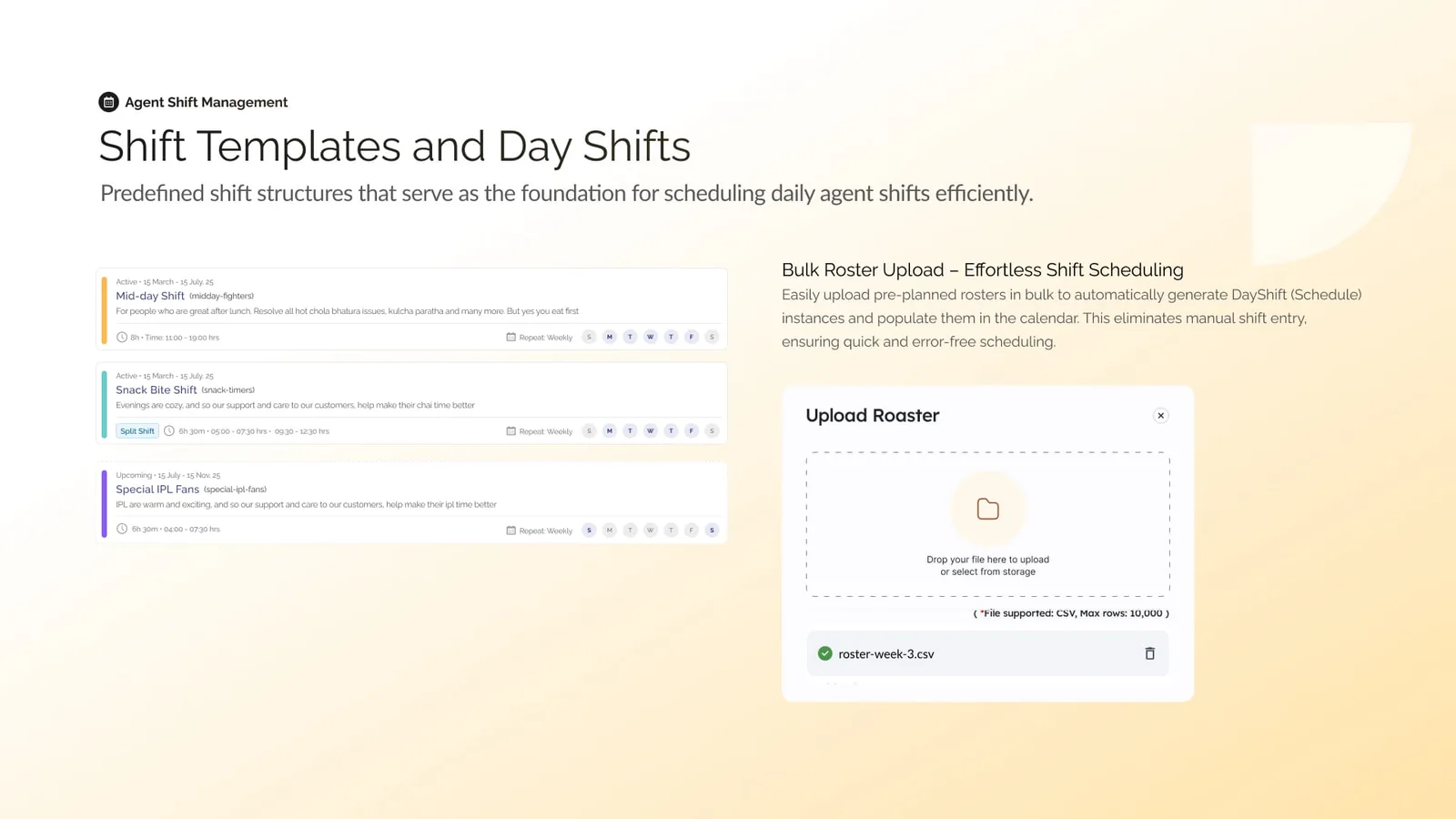 A template defines the pattern; a CSV assigns the people. The week builds itself out of the two.
This gave us a clear model:
Shift templates defined the pattern. Rosters assigned people. Daily shifts represented the final schedule.
It preserved the convenience of bulk planning while bringing the resulting data into the product.
Designing calendars for different roles
The calendar became the central interface of the system.
Agents needed a simple view of their own week. They wanted to know when they were working, when they were off, and whether any requests were pending.
Team leads needed a broader operational view. They had to understand who was scheduled, identify gaps, review changes, and monitor attendance across an entire team.
Instead of forcing both groups into the same experience, we created calendar views around their individual responsibilities.
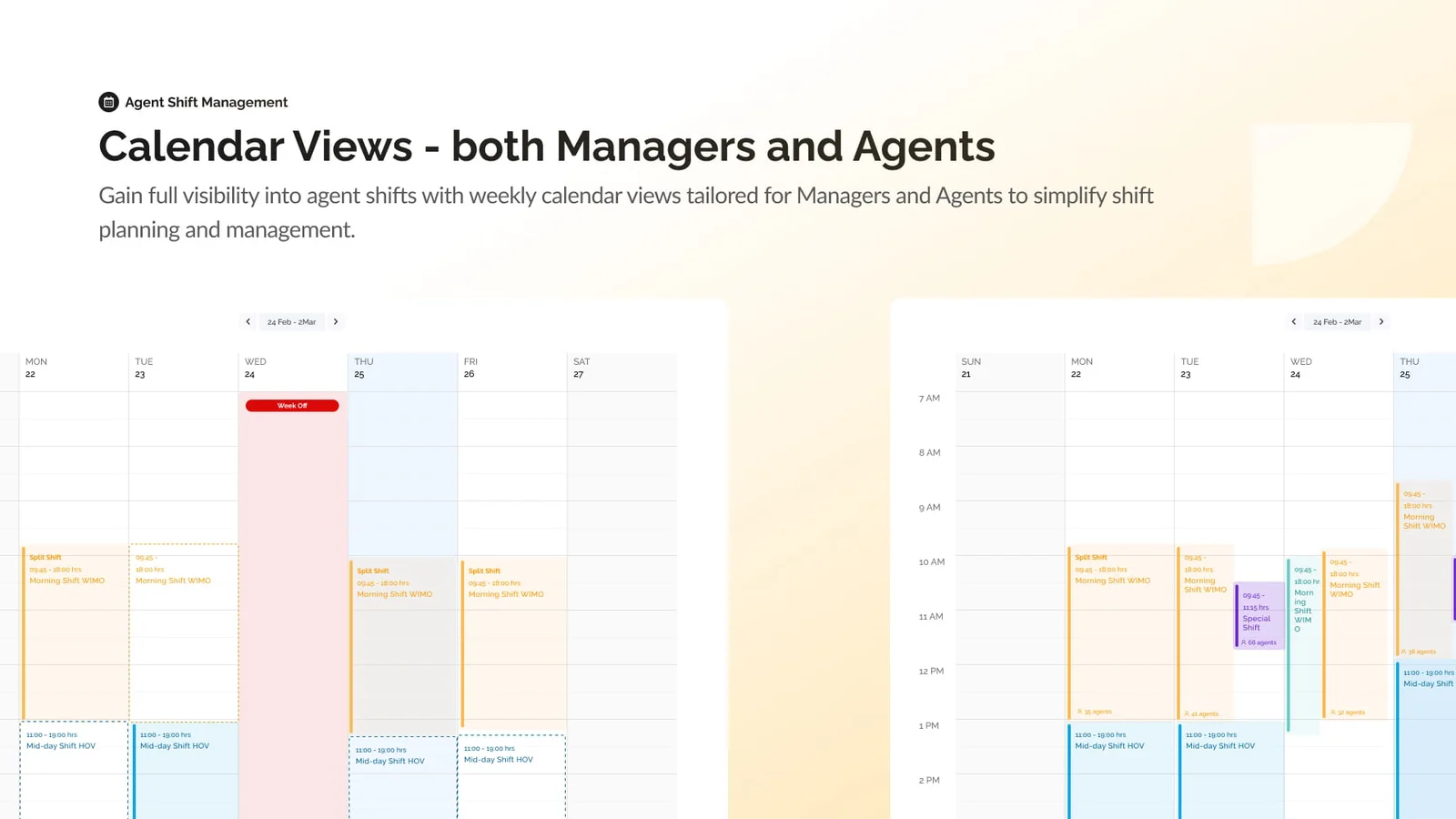 The same week, twice: what an agent needs to know, and what a team lead needs to see.
As the number of agents grew, navigation became another challenge. We added search so that people could quickly find a specific colleague or team member. This was especially useful when an agent wanted to find someone with a compatible schedule for a shift swap.
The frontend also had to present dense scheduling information without making the calendar difficult to scan. Colours, labels, timings, and schedule states were designed to communicate the most important information at a glance.
Moving schedule changes into the product
Shift changes previously depended on conversations, spreadsheet edits, and approvals that were difficult to follow.
We converted this into a clear request workflow.
An agent could find a colleague and send a shift-swap request. The receiving agent could review and accept it. The request would then move to the team lead for final approval.
Leave requests followed a similar structure. Agents could apply for a full day or half day directly through the portal, while team leads could review the request alongside the existing schedule.
This made every change visible and traceable. Agents no longer had to depend on informal coordination, and team leads could approve requests with a better understanding of their effect on workforce coverage.
Connecting the plan with reality
Scheduling was only one half of the problem. We also needed to understand whether the planned shifts were being followed.
The platform connected rostered shifts with actual login and logout activity. This allowed supervisors to identify:
- Total agent uptime
- Unattended shifts and no-shows
- Delayed shift starts
- Early logouts
- Schedule adherence
- Workforce utilization
- Productivity and shrinkage trends
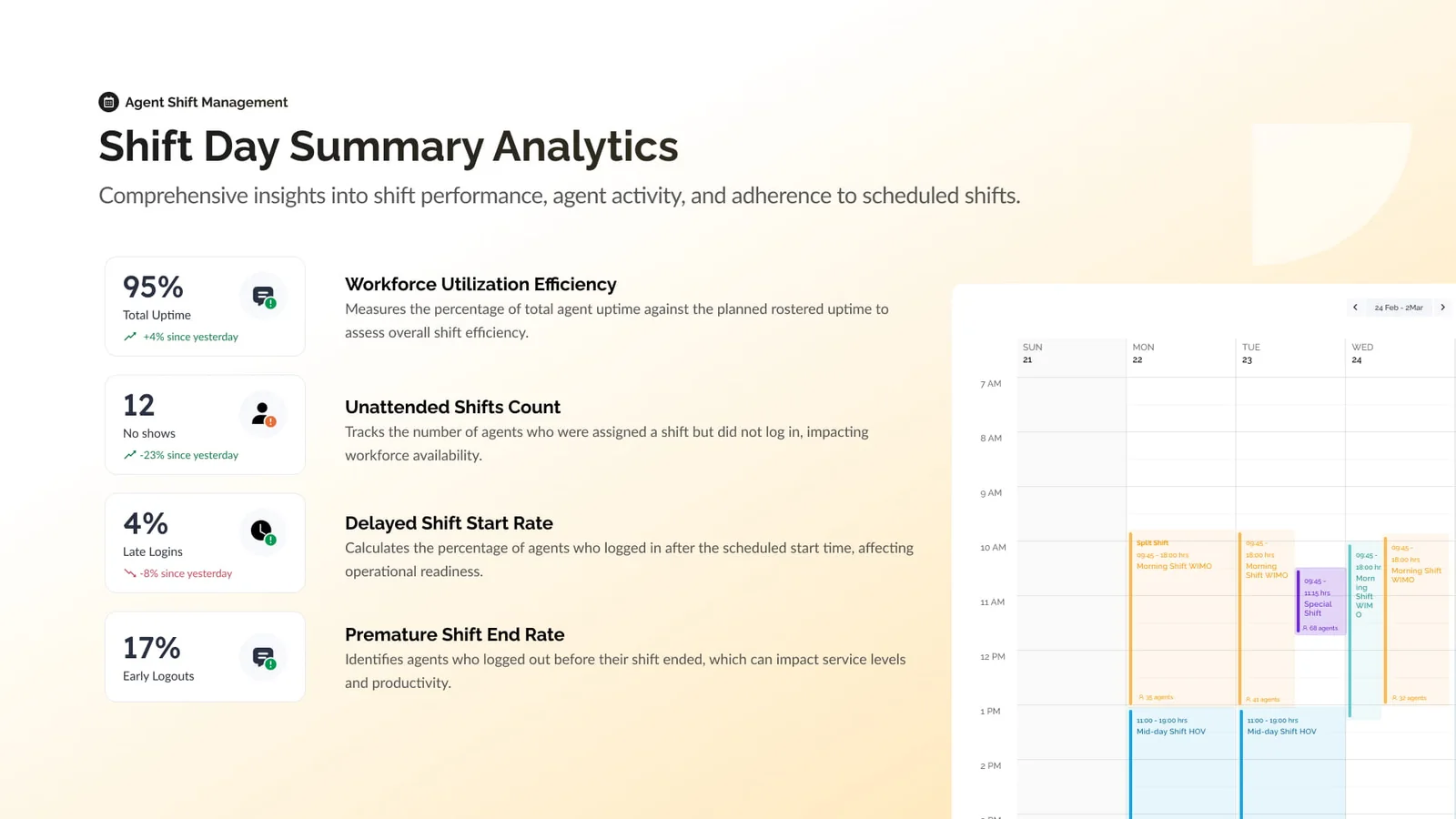 Planned coverage against what actually happened — the comparison the roster could never make.
These insights gave operations teams a clearer view of staffing health. They could see where coverage was falling short, understand recurring attendance patterns, and make better decisions for future rosters.
Automation alone was not enough, though. Login failures and other system issues could sometimes make an agent appear absent or late when they were not responsible for the discrepancy.
To account for this, team leads were given controlled ways to review and override certain attendance states. This kept the system useful without treating automated data as unquestionable.
My role
I led the project from the beginning, starting with requirements gathering and visits to support offices.
I worked through the core product flows, translated operational processes into usable interfaces, and led the frontend implementation of the platform.
My work included:
- Understanding existing roster and attendance workflows
- Identifying operational exceptions and permission requirements
- Designing shift templates and roster-management experiences
- Building role-specific calendars for agents and team leads
- Creating leave and multi-step shift-swap workflows
- Introducing search for faster agent discovery
- Presenting attendance and adherence metrics clearly
- Refining the product as new real-world scenarios emerged
A large part of the work involved balancing structure with flexibility. The system needed predictable workflows, but it also had to respect the judgement of the people running operations every day.
Outcome
The Agent Shift Management System replaced a fragmented, spreadsheet-led process with one connected platform.
Agents gained a clear view of their schedules and a simpler way to manage leave and shift changes. Team leads gained live visibility into attendance and adherence. Operations teams could compare planned coverage with actual workforce activity and use that information to improve future planning.
What began as a scheduling tool gradually became a shared operational layer for workforce management.
The most valuable outcome was not simply putting rosters online. It was creating a reliable connection between planning, people, attendance, and performance.
What I learned
This project reinforced the importance of observing a process before trying to improve it.
A spreadsheet may look inefficient from the outside, but it often contains years of operational knowledge, exceptions, and informal decisions. Replacing it successfully requires understanding why people use it the way they do.
The strongest decisions in this project came from speaking with agents and team leads, seeing their constraints firsthand, and allowing the product to evolve around real behaviour.
We did not just digitize a roster. We built a system that understood the work happening around it.